
A month of HR work, all in one place.
Clock-in and out, leave, overtime and work-from-home requests, shifts, approval chains and payroll exports — in one system, in Thai, Japanese and English.

Everything HR handles day to day
Every module reads the same data — from the moment an employee clocks in to the file your payroll team receives.
Clock-in and clock-out
Employees clock in from their phone with location. HR sees missed punches and records needing review straight away.
Leave, OT and WFH requests
Filing takes under a minute; balances and working days are calculated for you.
Multi-level approval chains
Set approvers per department and branch, with a decision history you can audit later.
Shift scheduling
Build weekly or monthly rosters, copy last cycle, and spot unfilled shifts on one screen.
Payroll data export
Worked hours, overtime and leave summarised per pay period, exported in the format your accountant uses.
Permissions and privacy
Role-based access down to the screen, plus a process for handling data-subject access and deletion requests.
Live in three steps, nothing to install
Open your workspace
Sign up with a company email, then set your organisation, time zone and annual holidays.
Import your people
Upload your roster file and assign departments, positions and approvers.
Invite the team
Send app invites — employees can clock in and file requests the same day.
Employees do it themselves, from their phone
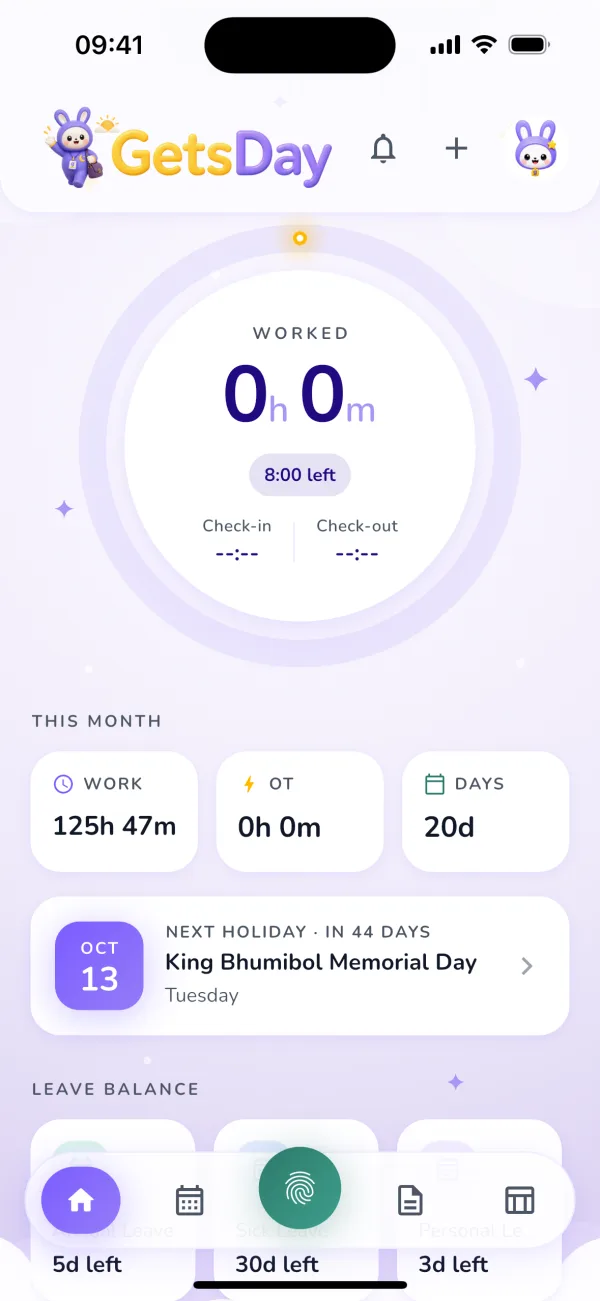
Clock in and out, file leave, overtime and WFH requests, check shifts and company announcements — one app, on iOS and Android.
Pick the plan that fits your team
Unlimited requests on every plan, billed on the headcount you actually use, upgrade whenever you need to.
What buyers ask us first
Do we need fingerprint scanners?
No. Employees clock in from their own phone, and each punch is checked against the branch and area you defined. If you already run scanners, their data can be imported alongside.
Can we migrate employee data from Excel?
Yes. Download the template, fill in names, departments and positions, then upload it back — rows with missing data are flagged before anything is saved.
Does it handle night shifts and multiple OT rates?
Yes. Shifts can cross midnight, and you can define overtime rates per day type and time window — holidays or night hours, for example — without any development work.
How is employee data protected?
Each company's data is isolated at the system level, and roles control who sees what. Every approval and time edit is recorded with who did it and when, and there is a workflow for access and deletion requests.
When can we change or cancel a plan?
From the account owner's settings at any time. If your headcount exceeds the lower plan's limit we tell you first — employee accounts are never deactivated automatically.
Try it free, then decide.
Our team helps you set up the company, import employee data, and get your first group clocking in for real.